Reading Your Human Design Chart Explained
So you’ve got your chart. Here’s what you’re looking at.
Let me guess…
You heard about Human Design and curiosity got the better of you. You ran your chart, and now you’re confused. WHAT does it all mean? What are the shapes in the middle of your chart? What are the numbers on the side?
That was my reaction too! I closed the window. I figured I’d get an email sequence follow up to explain it all to me. And yea, those emails came. But I never put the time aside to sit down and work it out email, by email.
So I paid for a reading. And not long after the reading I forgot what all the different pieces were. I couldn’t relate to content I found online because I couldn’t translate whether or not it applied to me.
So, If that’s where you’re at.. Lemme break it down for you.
Bookmark this page. Come back to it whenever someone mentions a term and you want to know where to find it on your chart.
Your Human Design Chart - Explained from top to bottom.
Planets | The columns down each side of your chart
Those two columns of symbols running down either side of the chart are your planetary placements.
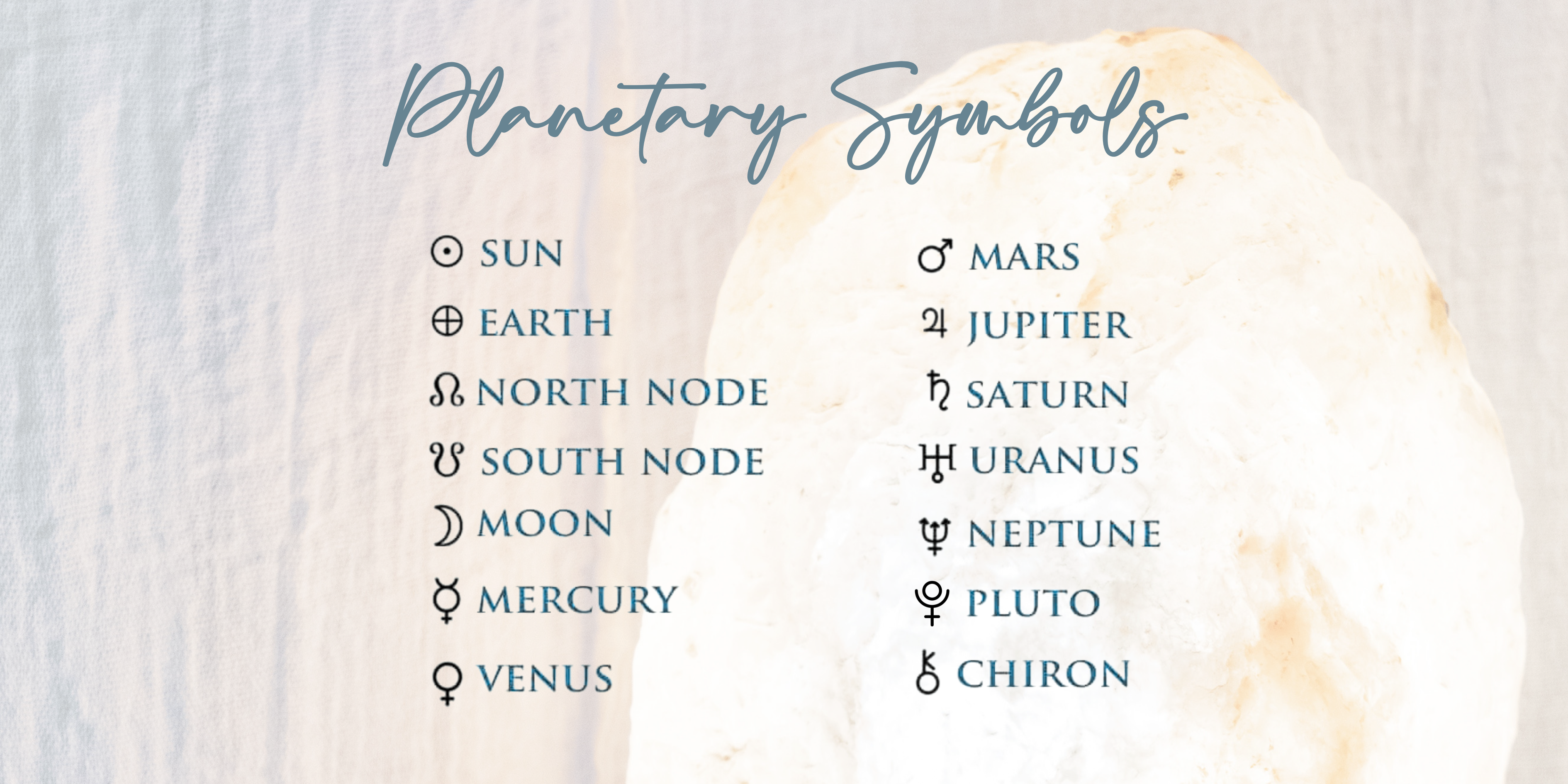
These are the locations of the planets at the time of your birth (right hand side, also known as conscious or personality) and approximately 88 days before your birth (left hand side, also known as unconscious or design).
Each symbol represents a planet. The image above shows you which symbol corresponds to which planet. Next to each symbol you’ll see a number, and that’s where the gates and lines come in
Gates + Lines | The numbers next to the planets
Next to each planetary symbol is a number. Each number has two parts, separated by a decimal point. The number before the decimal is the gate that this planet is activating. The number after the decimal is the line frequency of this gate.
Bodygraph | The image in the middle
The bodygraph is the figure sitting between the two columns. It’s made up of shapes (centres), numbers (gates), and lines connecting them (channels). The numbers inside the bodygraph are the 64 gates of the Human Design system. The coloured numbers in your bodygraph will correspond to the planets on the outside. This means they are activated in your chart.
Centres | The shapes inside the bodygraph
There are nine shapes inside the bodygraph and each one represents a different energy centre, loosely related to the chakra system.
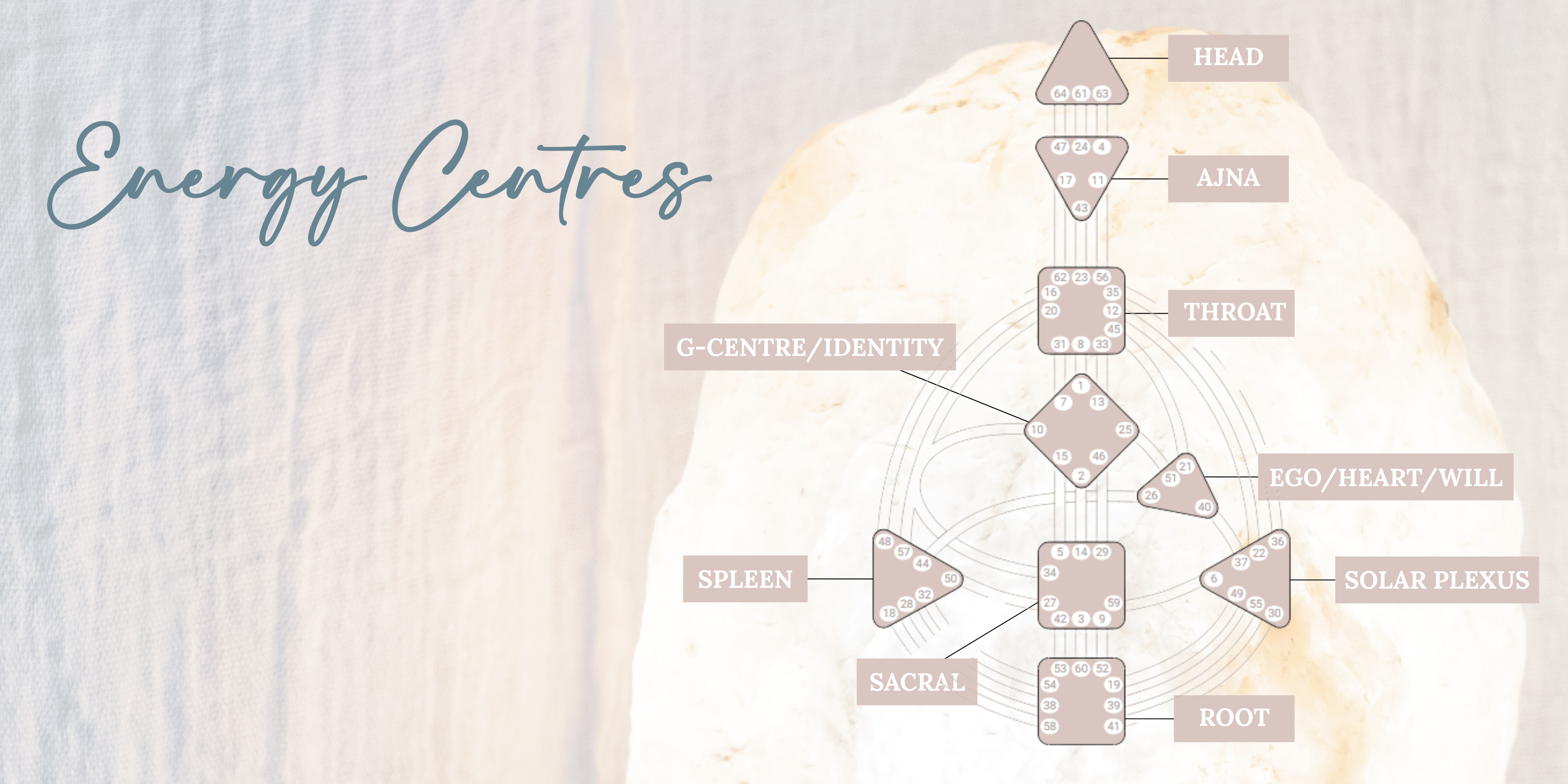
This image shows which centre is which. If a centre is filled with colour, it’s defined for you, meaning that energy is consistent and reliable in how it operates. If it’s white, it’s open or undefined, meaning you’re more fluid and receptive in that area. Your defined centres are a large part of what makes you, you.
Side note: Technically open is if there are no gates in that centre coloured in or defined for you, but most people use open and undefined interchangeably.
Channels | The lines connecting the centres
Channels connect two centres, and each end of a channel is a gate. When both gates at either end of a channel are activated, the whole channel is defined, and both centres connected by it become defined too.
If only one end of a channel is coloured in, that’s a hanging gate. It is not a defined channel. You have the energy of that gate, but without the full channel being activated, it doesn’t define either centre.
Variables | The arrows near the top of the chart
If shown, the arrows on either side of the head centre in your bodygraph are your Variables. They relate to your digestion, environment, motivation, perspective, and sense. Their definitions for your specific chart are often listed in the key details section. They are fascinating to learn about but are more nuanced than other elements. I don’t recommend starting here - get comfortable with the basics first, and come back to these later.
The Details Section | Type, Strategy, Authority, Profile, Definition and Incarnation Cross
Depending on which software you use to run your chart, your key details will appear either beside or below the bodygraph. Exactly what shows also varies by software but here’s what’s included in mine:
Incarnation cross
Your incarnation cross is taken from the two gates listed at the top of each planetary column. It goes in order of Conscious sun, conscious earth, unconscious sun, unconscious earth.
Type
Your type is calculated by which centres are defined and how they connect. There are five types: Generator, Manifesting Generator, Projector, Manifestor and Reflector..
Strategy
Strategy is based on your type, and is how you’re designed to move through life in a way that creates the least resistance.
Authority
Your authority is your inner decision-making compass, determined by which centres are defined. It’s the thing most people wish they knew sooner.
Profile:
Your profile comes from the line numbers (right of decimal point) of your conscious and unconscious sun. For example Mine is 4/6. Your profile describes the role you’re here to play and how you’re designed to learn and connect with others.
Definition:
This refers to whether your defined centres are connected as a whole or if there are separate groups that don’t link up. You might see single, split, triple split, or quadruple split definition
Signature theme:
This is the feeling you experience when you’re living in alignment with your design. It’s type-specific, and it’s worth knowing because it acts as a signal that you’re on the right track.
Not-Self theme:
This is the opposite of your signature theme. It’s the emotional signal that tells you something is off. Again, it’s type-specific, and once you know yours, you’ll start to notice it often.
Ready to go deeper?
Now you know what you’re looking at, the best next step is understanding what it actually means for you. Grab your free Quick Start Guide here for a plain english breakdown of your type, how your energy works and where most people with your design get tripped up.